

Description
Download AttributeMagic Free – Portable Windows Tool for File Attribute Management
AttributeMagic Free is a lightweight, portable freeware utility designed specifically for Windows users who need quick and secure access to file and folder attributes. This powerful yet simple tool allows you to view and modify critical file properties such as read-only, hidden, archive, system, and compressed attributes. Beyond basic attribute changes, AttributeMagic Free enables users to rename files and folders, alter file extensions, and modify date-time stamps—including creation, last accessed, and modification dates. Perfect for organizing digital libraries, preparing files for archiving, or troubleshooting permission issues, this software delivers essential functionality without requiring installation. Its portable nature means you can run it from a USB drive, making it ideal for use on multiple systems. Whether you're a casual user managing personal files or a professional handling batch file adjustments, AttributeMagic Free provides a reliable, secure, and fast solution for file attribute control.
Key Features of AttributeMagic Free
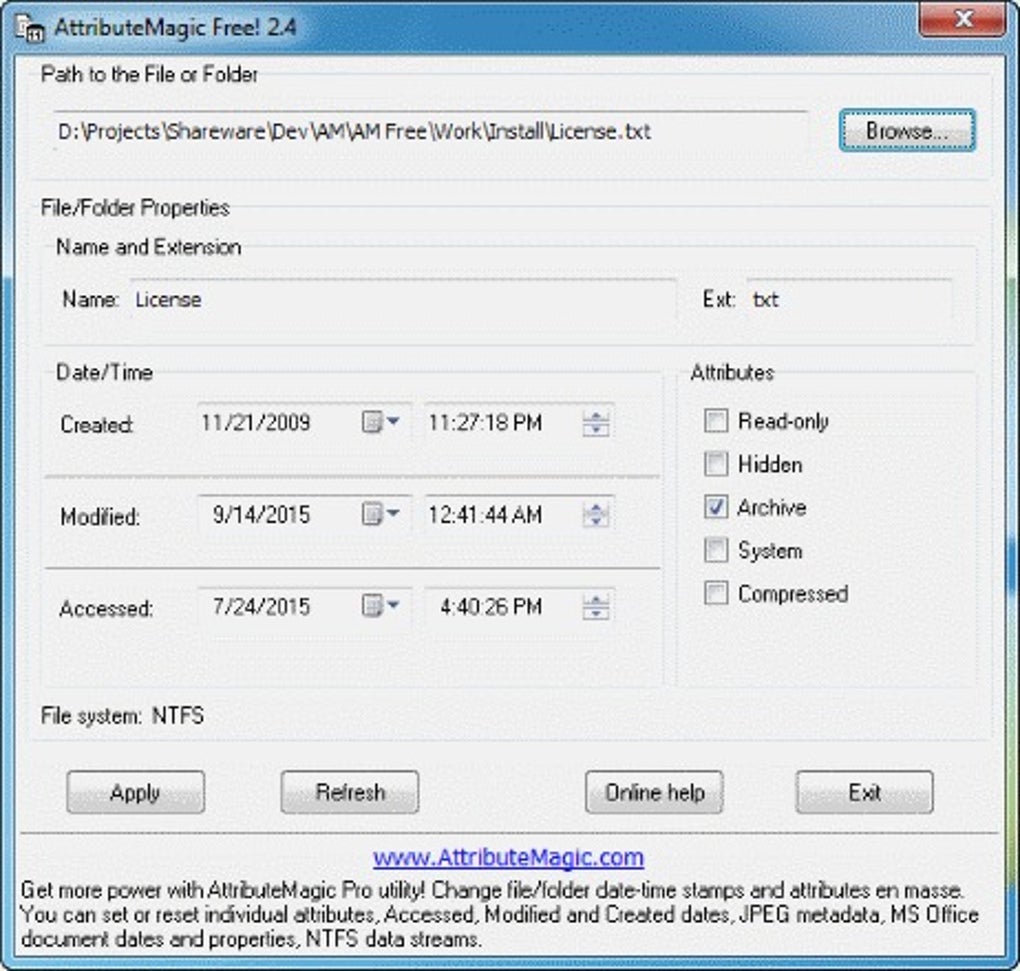
AttributeMagic Free stands out in the crowded field of file management tools due to its focused functionality and user-friendly design. One of its most valuable features is the ability to modify file and folder attributes with a single click. Users can toggle the Read-only, Hidden, Archive, System, and Compressed attributes—commonly used in Windows for file protection, visibility, and backup tracking. This is particularly useful when dealing with system files or preparing folders for backup software that relies on the archive attribute.
Another standout feature is the date-time stamp modification. AttributeMagic Free allows you to change the creation, last accessed, and modification timestamps of files and folders. This capability is invaluable for digital forensics, data recovery scenarios, or when syncing files across systems with mismatched clocks. For example, if you're transferring files from an older computer, you can adjust their timestamps to match the current system, avoiding confusion in file sorting or version control.
The tool also supports batch renaming and extension changes, which saves significant time when managing large collections of media files, documents, or project assets. You can rename multiple files using patterns, prefixes, or numbering sequences, and change file extensions in bulk—perfect for converting legacy file formats or standardizing naming conventions. Additionally, the software is portable, meaning it runs without installation, leaving no traces on the host system. This enhances security and makes it ideal for use on public or shared computers.
How to Install and Use AttributeMagic Free
One of the biggest advantages of AttributeMagic Free is its simplicity in both installation and usage. Since it’s a portable application, there’s no traditional installation process. To get started, simply download the compressed package from the official website, extract it to any folder (like your desktop or USB drive), and run the executable file—AttributeMagicFree.exe. No admin rights are required, and the tool runs directly from the extracted folder.
Once launched, the interface is clean and intuitive. You’ll see a file explorer-like window where you can navigate through your directories. Select one or more files or folders using standard selection methods (Ctrl+click, Shift+click). Right-click on the selected items to access the context menu, where you’ll find a dedicated AttributeMagic Free option. Clicking it opens a powerful attribute editor with multiple tabs.
The Attributes tab lets you check or uncheck boxes for Read-only, Hidden, System, Archive, and Compressed. The Date/Time tab allows you to manually set the creation, last accessed, and modification dates. You can use the calendar picker or enter values directly. The Rename tab enables you to change the file name and extension. You can apply changes to individual files or apply them to all selected items simultaneously.
After configuring your changes, click Apply to execute the modifications. The tool confirms the operation and logs the changes, ensuring transparency. For advanced users, the software also supports drag-and-drop functionality, allowing you to drop files directly into the window for immediate editing. This streamlined workflow makes AttributeMagic Free one of the most efficient tools for routine file maintenance tasks.
Compatibility and System Requirements
AttributeMagic Free is designed exclusively for the Windows operating system, supporting all major versions from Windows 7 through Windows 11. It is compatible with both 32-bit and 64-bit architectures, ensuring broad accessibility across desktop and laptop systems. The software is lightweight, requiring minimal system resources—typically less than 10 MB of RAM and negligible CPU usage—making it suitable even for older or low-end machines.
Since it’s a portable application, AttributeMagic Free doesn’t require installation, which enhances compatibility across different environments. It works seamlessly on corporate networks, public computers, and personal devices without triggering antivirus alerts or requiring administrative privileges. This makes it an excellent choice for IT professionals, educators, and students who need a reliable tool across multiple machines.
While the free version is limited to basic attribute and timestamp modifications, it integrates well with other file management workflows. It can be used alongside tools like FreeCommander, 7-Zip, or IrfanView for a complete file handling suite. For users who need more advanced features—such as metadata editing in images, batch processing of Office documents, or NTFS data stream manipulation—Elwinsoft offers AttributeMagic Pro and Standard Edition, which provide extended capabilities.
Importantly, the software is secure and free from malware. It is regularly updated to fix bugs and improve stability. The developers at Elwinsoft maintain a transparent release history, and the tool is distributed through trusted sources. This ensures that users can download and use AttributeMagic Free with confidence, knowing their systems remain protected.
Pros and Cons of AttributeMagic Free
- Pros:
- Completely portable—no installation required
- Lightweight and fast performance
- Simple, intuitive interface
- Secure and free from malware
- Supports batch renaming and extension changes
- Allows modification of all major file attributes
- Editable date-time stamps for creation, access, and modification
- Free to download and use
- Works on Windows 7 through Windows 11
- Cons:
- Limited to Windows only
- No support for macOS or Linux
- Advanced features (like metadata editing) require paid upgrades
- No built-in preview for file changes before applying
- Basic interface lacks customization options
Frequently Asked Questions (FAQ)
- Is AttributeMagic Free safe to download and use?
- Yes, AttributeMagic Free is completely safe and free from malware. It is developed by Elwinsoft and distributed through official channels. The portable nature of the tool also reduces the risk of system changes or unwanted installations.
- Can I use AttributeMagic Free on a USB drive?
- Absolutely. Since it’s a portable application, you can extract it to a USB drive and run it from any Windows PC without leaving traces. This makes it ideal for on-the-go file management.
- Does AttributeMagic Free support batch processing?
- Yes, you can apply attribute changes, renaming, and timestamp modifications to multiple files at once. This is especially useful when organizing large folders or preparing files for backup or transfer.
- Can I modify file creation dates?
- Yes, AttributeMagic Free allows you to change the creation date and time of files and folders. This is useful for syncing files across systems or correcting timestamps after file recovery.
- What happens if I make a mistake while editing attributes?
- The tool does not automatically create backups. However, it logs changes and allows you to revert changes manually. For critical operations, it’s recommended to back up files before modifying attributes or timestamps.
Conclusion: Why You Should Download AttributeMagic Free Today
AttributeMagic Free is a must-have tool for any Windows user who needs precise control over file attributes and timestamps. Its portable design, zero installation requirement, and lightweight performance make it ideal for both casual and professional use. Whether you're renaming a batch of photos, fixing file permissions, or adjusting timestamps for data consistency, this software delivers reliable results quickly and securely.
While the free version has some limitations compared to the paid Pro and Standard editions, it still provides essential features that are hard to find in other free tools. For users who value simplicity, speed, and security, AttributeMagic Free offers unmatched value. It’s perfect for students, educators, IT support staff, and anyone managing digital files regularly.
Don’t miss out on this powerful, free, and secure Windows utility. Download AttributeMagic Free now and take full control of your file system with ease.
Guides & Tutorials for AttributeMagic Free
How to install AttributeMagic Free
- Click the Preview / Download button above.
- Once redirected, accept the terms and click Install.
- Wait for the AttributeMagic Free download to finish on your device.
How to use AttributeMagic Free
This software is primarily used for its core features described above. Open the app after installation to explore its capabilities.
User Reviews for AttributeMagic Free 0
No reviews found





